The work continues outside the room.
A useful reflection rarely waits for the next appointment. Give clients a place to practise assigned skills and capture what they want to bring back.
Anchr · For Therapists
More presence in the session. More continuity between them. Your clinical record, AI-assisted notes, telehealth, billing and client app, connected around the work you do together.
Launching soon · Request early access No credit card · Linking clients is free
The Premise
An hour with you is where the work begins.
167 hours without you is where that work meets everyday life.
The week is full of moments worth bringing back to the room.
Anchr connects them to the next conversation, within the sharing choices your client makes.
The thought that arrives on the train. The exercise they try on Tuesday. The thing they mean to tell you next time. Anchr helps connect those moments to the next conversation, within the sharing choices your client makes.
A useful reflection rarely waits for the next appointment. Give clients a place to practise assigned skills and capture what they want to bring back.
Talk it Through draws on assigned material and your signed continuity brief. It offers guided self-help between appointments, with clinical decisions staying with you.
Review shared reflections, lesson activity and the threads worth returning to. Spend less of the next session reconstructing the week.
Before. During. After. Between. Follow the week in order, or jump to the moment that matters to your practice. Each scene is a live miniature of the portal.
Your next session, with the important threads already in view.
Brainstorm reads everything the chart holds - signed notes, screening trajectory, mood shifts, lesson reflections and Talk it Through transcripts - and returns a working formulation, falsifiable hypotheses, suggested techniques with literal opening lines, and risk watch-points. Pin what matters to a one-page Plan / Context / Watch For brief, and walk in already oriented.
A connected appointment, with the final note still yours to approve.
Run secure telehealth from the portal that holds the record, or capture in-person work from web or mobile. With consent, the pipeline runs the moment the session ends: audio transcribes, a note draft lands for your review, an optional client summary queues, and Stripe charges the card on file. Everything ties back to the appointment. Audio deletes after you sign.
Handwritten notes? Snap a photo and Anchr digitises them into the same signable record.
A clear next step your client can return to during the week.
Assign from 286 evidence-based modules across CBT, DBT, ACT, Psychodynamic and IPT, or write your own in your language and clinical frame. The app your clients open carries your practice branding - your name, logo and colours, Powered by Anchr underneath. Lessons pace out across the week, reflections sit beside the material that prompted them, and every completion, skip and breakthrough flows back to your portal.
Shared reflections that help you pick up where life left off.
Talk it Through gives your clients a place to work with what you have introduced between appointments. With the client's consent and sharing settings, it draws on the modules you assigned, the lesson notes your client writes, their mood and defusion entries, and the signed continuity brief that tells the Guide what to keep alive, avoid or watch. By the next morning, the chart shows what landed, what bounced and what needs your attention - in their words.
Illustrative product walkthroughs · Review and consent remain part of the real workflow.
Telehealth, notes, modules, reflections, Talk it Through, screening and billing, feeding the same record instead of another disconnected tab. Select any part of the platform to see what flows where.
Secure video runs from the portal that holds the record, tied to the appointment it belongs to.
One keystroke, Cmd-K, from any page of the portal. The Assistant knows the open chart, live transcript, signed notes, screening trajectory, homework, risk flags, continuity brief and calendar. Every write action queues for one-click confirm before anything lands.
Triage the caseload, plan the session, draft the artefact and steer between-session care. Try one:
Interactive, illustrative demo with sample client data.
Caseload triage, safety posture, between-session drift. Every claim cites its source.
Reads outcome plateaus, homework friction, unresolved signals and recurring themes, then offers clinical pivots to consider. It never changes the plan.
PHQ-9 and GAD-7 trajectory, reliable change or plateau, and whether the formulation still fits. Ready for an MHCP review.
A 90-second recap from the live transcript, the post-session note draft, and the continuity brief that steers Talk it Through.
MHCP review letters, progress reports, discharge summaries, safety plans, case formulations, custom modules and client emails. Unsigned until you sign.
Ask "What would a supervisor say?" about a signed note or a Brainstorm, and a clinical critique lands in the Assistant.
"What's on my plate?" "Clear my Friday." "Charge today's session." It checks conflicts and turns each request into a confirm card.
Unsigned notes past 14 days, missing C-SSRS, high-risk clients without a safety plan, and formulations older than 90 days.
Every write action waits as pending for your one-click confirm. Every action is logged.
Things you can ask
Read-only questions answer straight away. Anything that changes the chart, calendar or billing waits for your confirm.
One portal for the record, the work, the AI and the business layer. Dashboard, modules, notes, lesson reflections, Brainstorm, session briefs, patient files and direct billing, all feeding the same chart.
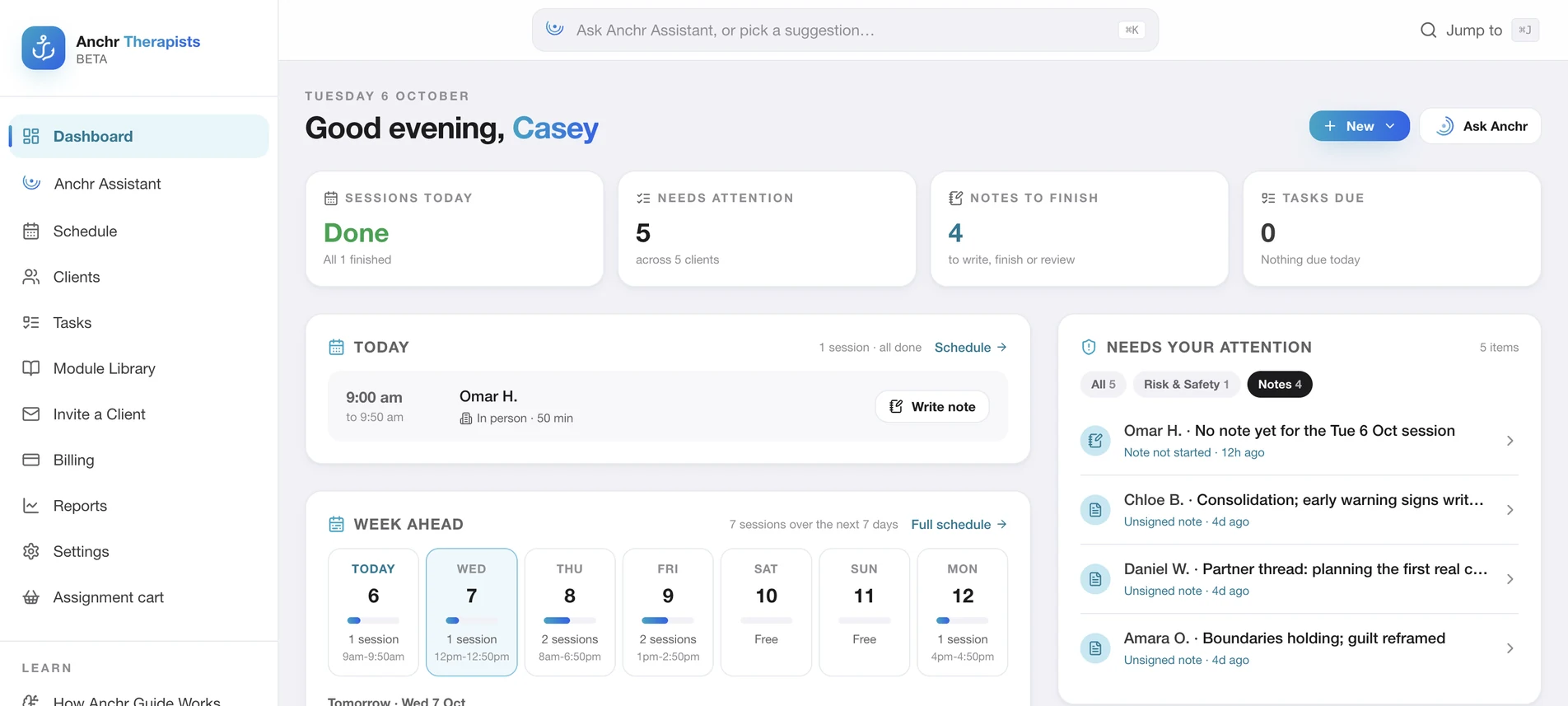
Today's sessions, deteriorating clients, silence, safety flags and homework drift, surfaced as a triage layer. One tap takes you from practice-level signal to the exact chart evidence behind it.
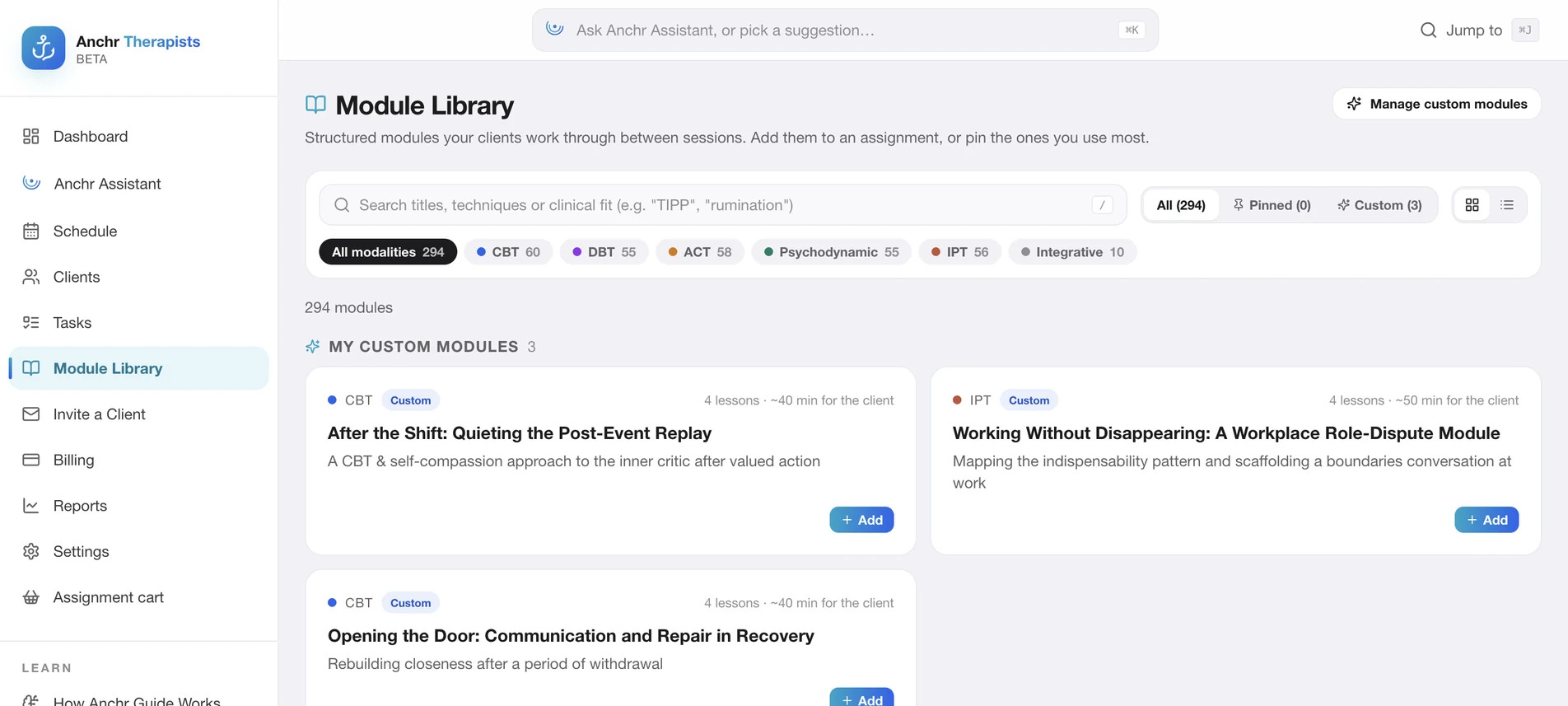
286 modules and 1,251 lessons across CBT, DBT, ACT, Psychodynamic and IPT, plus your own custom modules in your language. Every assignment is readable by Talk it Through and measurable in the portal.
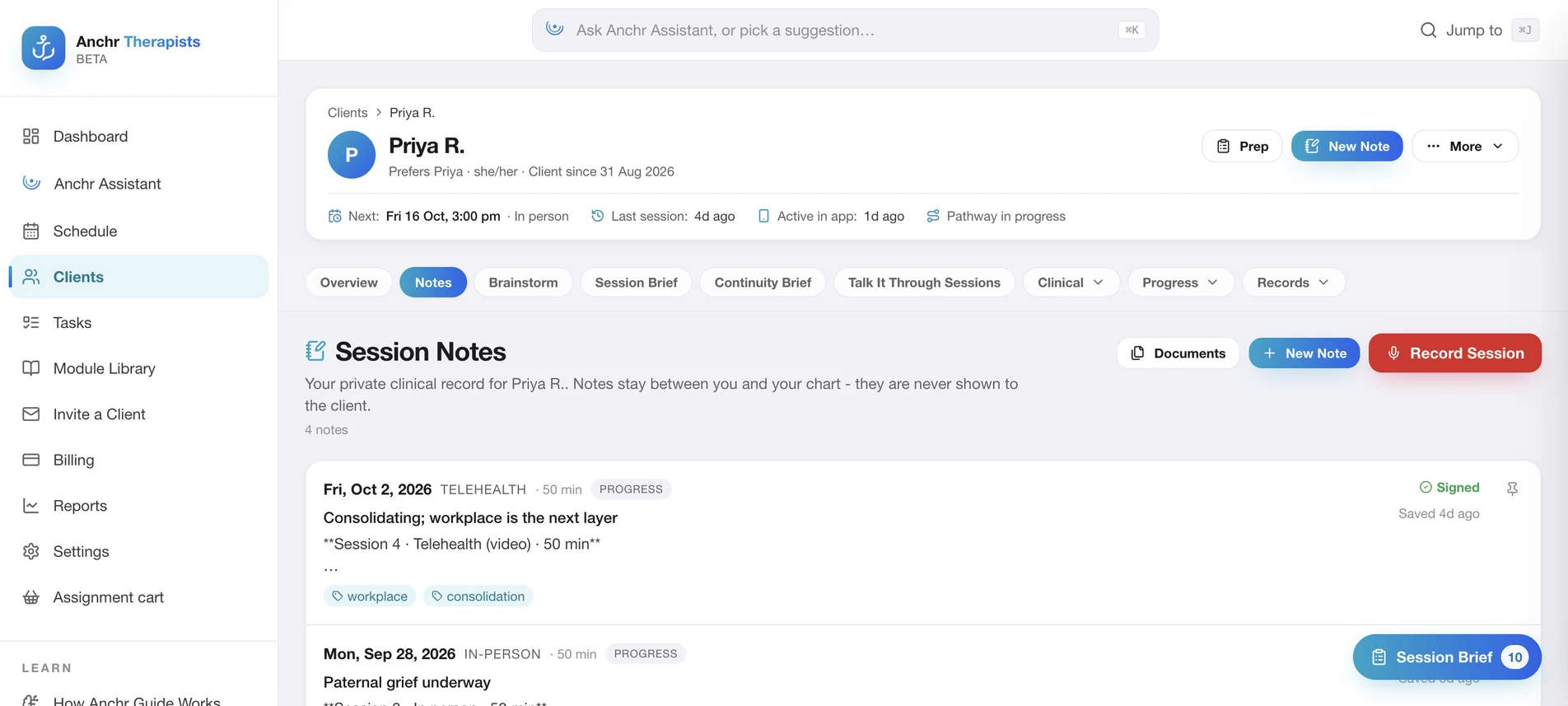
Telehealth transcription, dictation or a photo of handwritten notes all resolve into one signable, searchable record. You review, sign and lock; the audio deletes itself.
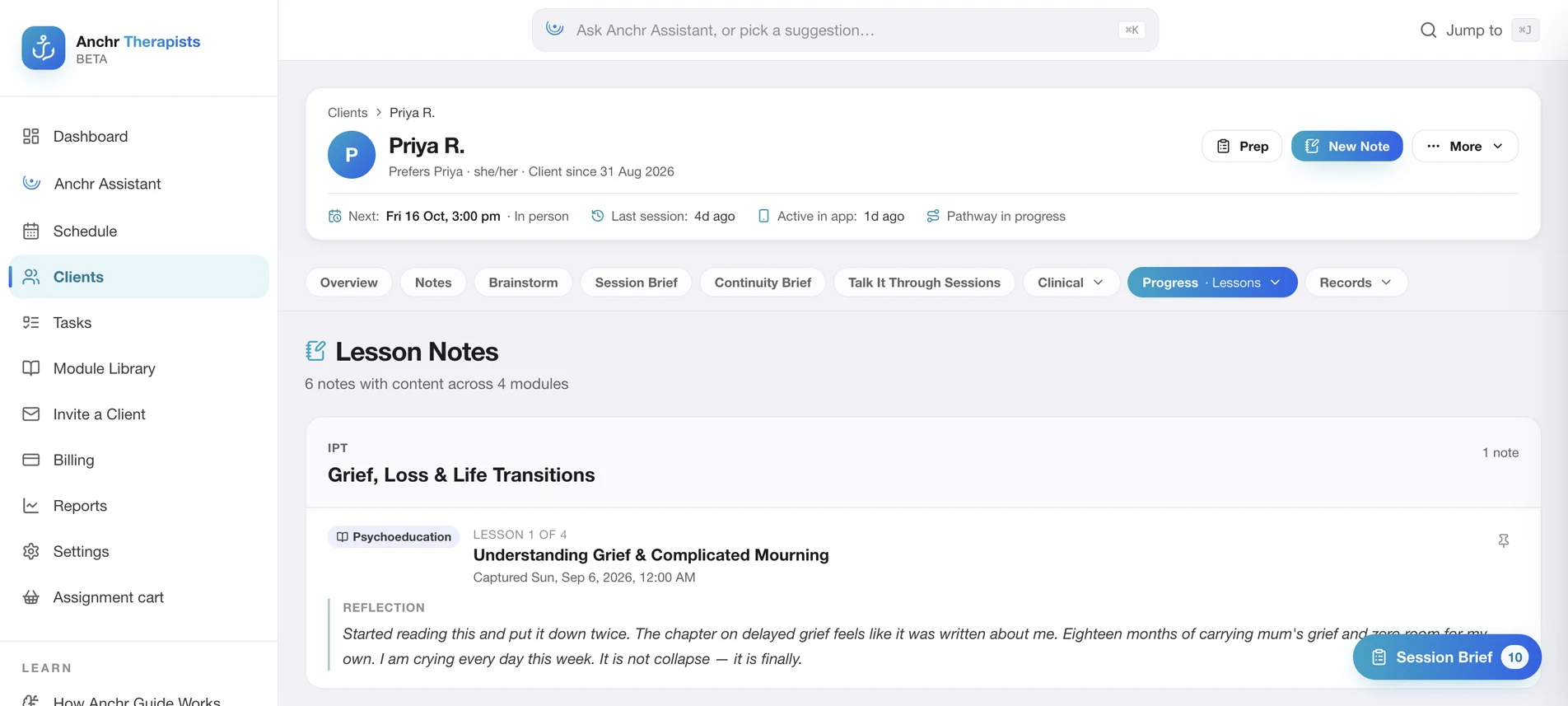
Every lesson has a private reflection space, captured beside the exact material that prompted it. You see what clicked, what confused them and what they put into their own words, before the session starts.
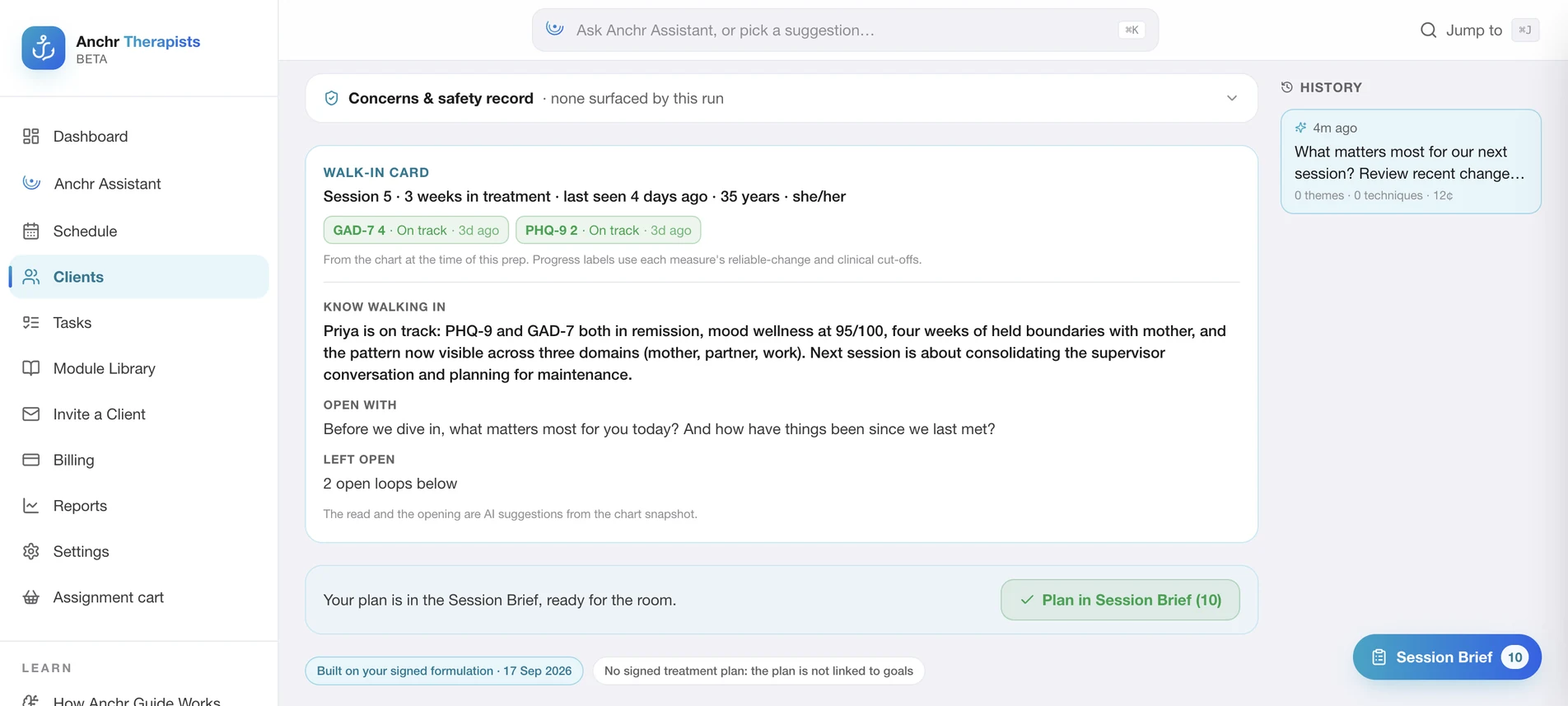
Brainstorm reads the signed notes, mood trajectory, reflections and transcripts, then returns a formulation, falsifiable hypotheses, intervention options and literal opening lines. Clinical thinking grounded in this client.
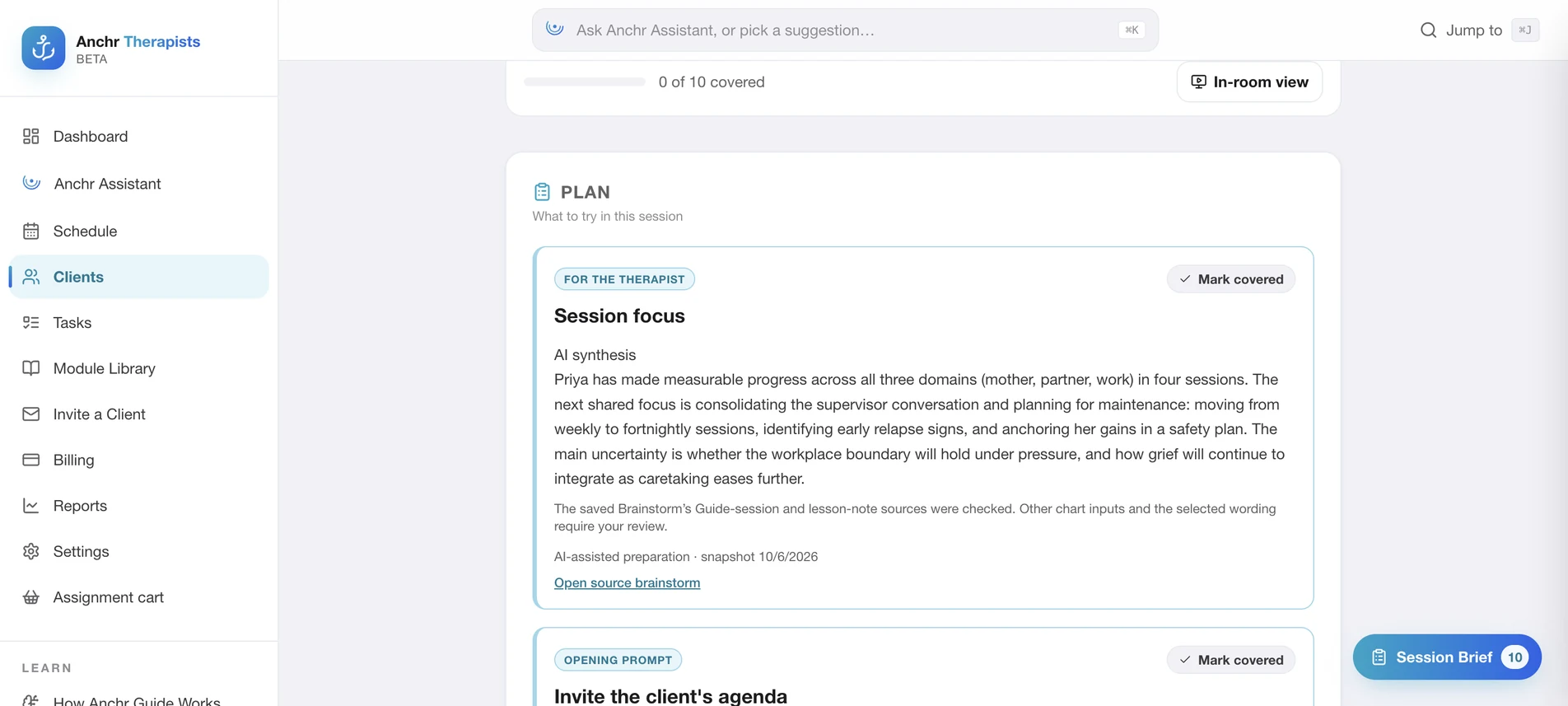
Pin the signal that matters from the brainstorm, chart, notes and between-session activity. Anchr condenses it into Plan / Context / Watch For, so you walk in with the active threads already named.
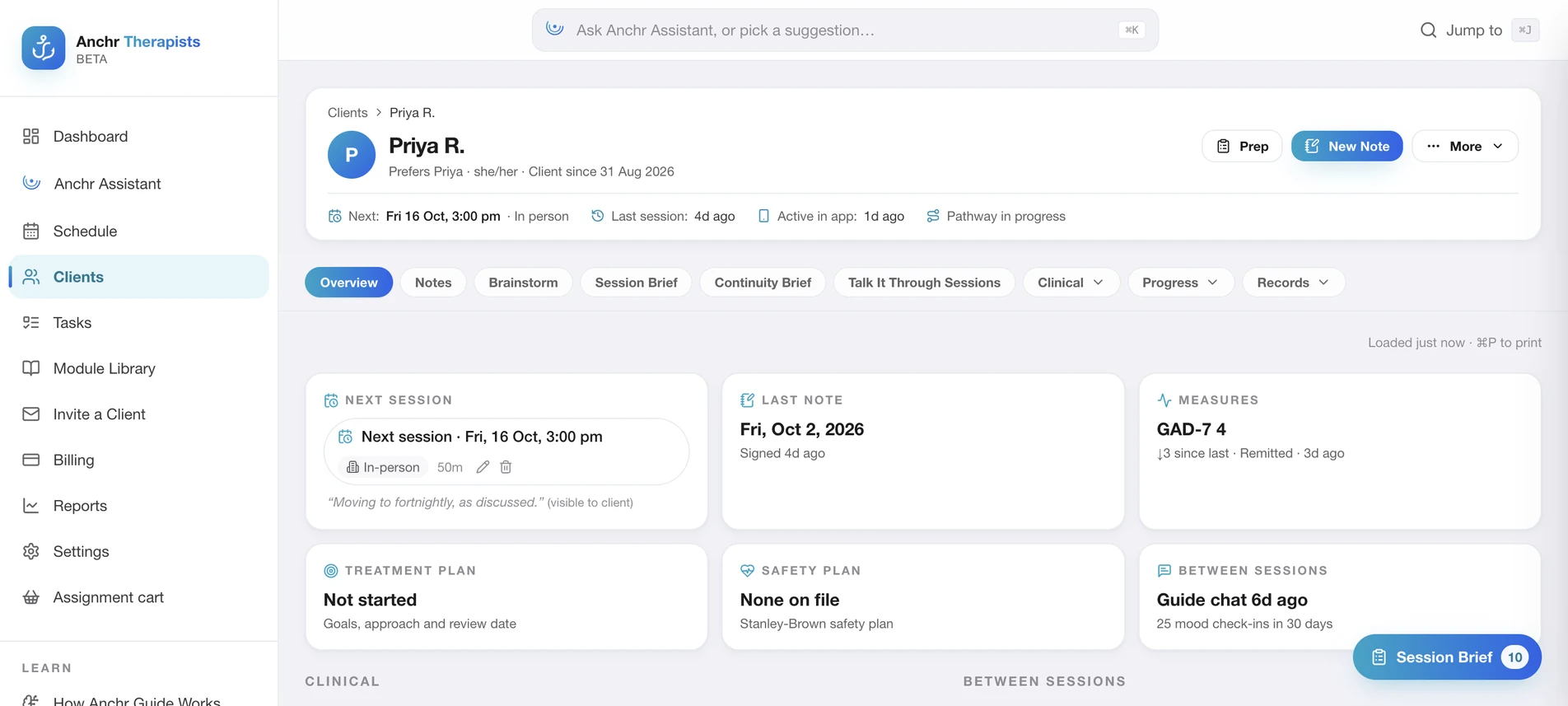
Demographics, pathway, notes, sessions, lessons, mood, screening, MHCP, consent, ROI and billing in one chart. Couples and family attendees resolve inline. Exports and audit trails stay attached to the person.
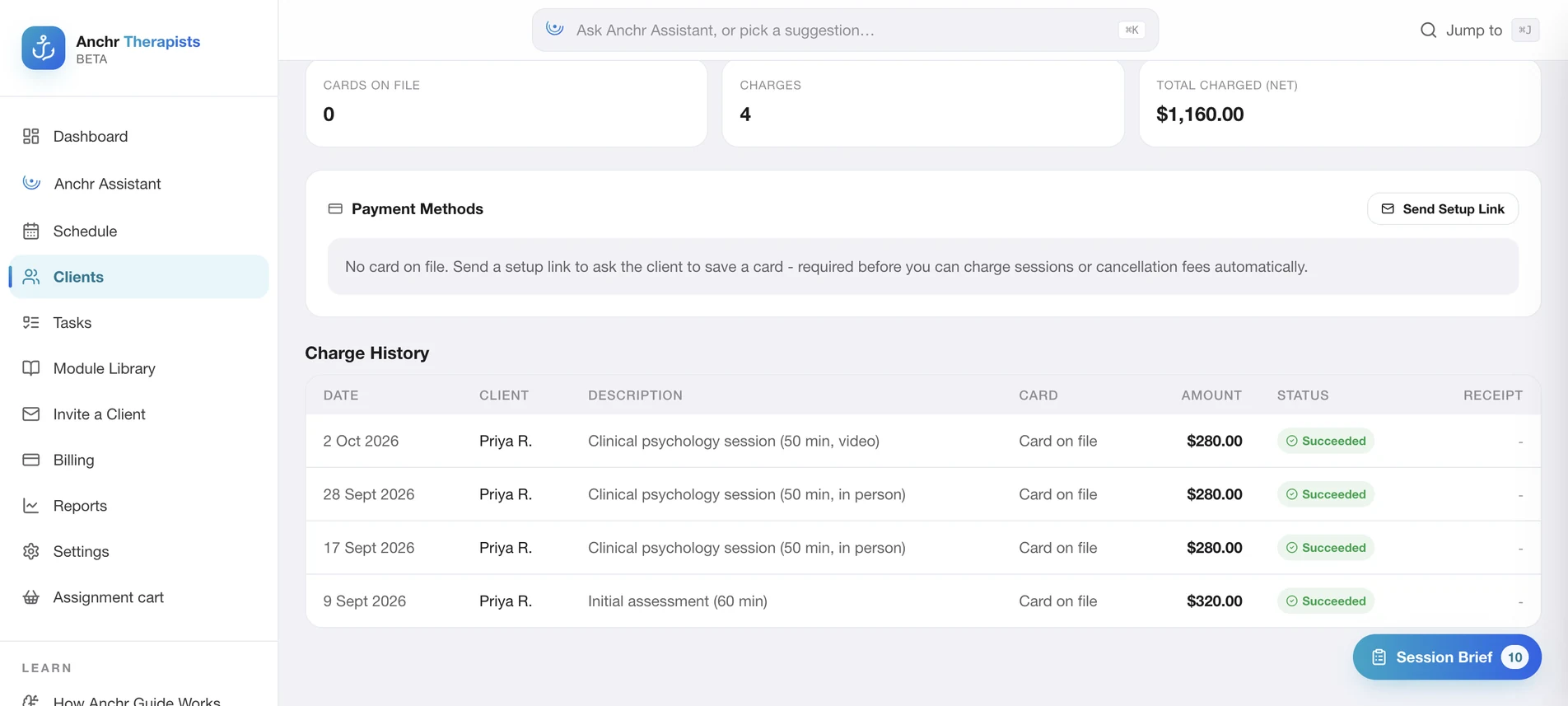
Save a card at intake, charge sessions in one tap, and apply cancellation fees by your rules. Stripe pays the fee straight to your account, less a 1% Anchr platform fee, with payment history beside the clinical record.
A connected platform should make it easier to understand what is shared, what the AI does, and where your review matters. Try each one.
Nothing enters the chart until you sign.
AI-assisted notes arrive as drafts. You review and sign them. The Assistant presents proposed actions for confirmation, so clinical decisions remain with you.
Explore the clinical co-pilotClients connect to your practice with consent. Sharing settings determine what reaches you; your session notes remain separate from material you deliberately share with a client.
Understand consent and accessTalk it Through offers guided self-help inside the structure you set. AI can make mistakes. Anchr is not an emergency service or a substitute for clinical assessment, and alerts do not guarantee an immediate response.
Read how the Guide worksUnderstand the data behind the experience: hosting, AI providers, processing locations and your rights
Anchr for clinicians is launching soon, and these are our launch prices. Pay per session with no monthly fee, or choose a plan built for full-time practice. Every option includes the therapist portal, telehealth, AI session notes, Anchr Assistant and the client app. Linking clients to the app is free, and Talk it Through is billed only for clients who use it. Client payments you take through Anchr carry a 1% platform fee.
Estimate in AUD excluding GST, at launch prices. A session is a telehealth session or an AI note. Founding 200 is limited to the first 200 therapists, for their first 24 months.
For part-time and growing practices. No monthly fee: pay only for the sessions you run.
For full-time practice, with 150 sessions included each month and the full clinical toolkit.
The first 200 therapists get Professional at a founders' rate for their first two years.
Launching soon. Prices in AUD, excluding GST · 14-day full-product trial at launch · No credit card required
Keep the human connection. Carry the context. The value is in what you can bring back to the person in front of you: a clearer starting point, a shared next step, less time piecing the story together.
The questions practising clinicians ask first, answered straight. The full FAQ covers the rest.
Read the full FAQ for therapistsNothing. Client app seats are included in your subscription - 20 on Anchr Lite, 35 on Anchr Standard. Your clients download the Anchr app free, connect to your practice, and never see a paywall.
Yes. Set your practice name, your guide's name, logo and colours in the portal, and every linked client sees your brand across their app, with a small "Powered by Anchr" underneath. Practice identity is included on every plan; logo and colours come with Anchr Standard, and you can try them free during your trial.
You. Session notes are closed by default - clients never see them. Anything you want a client to hold lives in separate, deliberate artefacts like the treatment plan or safety plan. Every access to the chart is audit-logged.
Talk it Through surfaces crisis content rather than silently filtering it, even at low confidence. The client is pointed to crisis support in the moment, and relevant disclosures can be flagged for therapist review. Anchr is not an emergency service and the portal is not continuously monitored. A flag does not guarantee detection of every risk or an immediate response; agree on crisis arrangements with your clients separately.
Anchr's Guide is a self-help guide that works inside the structure you set - your modules, your continuity brief, your treatment direction. It is not intended to diagnose, and the clinical authority stays with you. Anchr complements therapy; it never replaces it.
It is your clinical record. Export charts and notes, and billing runs on your own Stripe account with a 1% Anchr platform fee. You can review the export options and cancellation terms before you start.
Hosting and AI processing are distinct. Anchr uses service providers for storage, AI and other features; the Privacy Policy describes processing in Australia, the United States and other locations where those providers operate. Read the provider and international transfer details, and discuss any practice-specific requirements with us before bringing client data into the platform.
I built Anchr because so much of the work of therapy happens in the week between sessions, and the tools therapists had never reached it.
Every practice that trials Anchr gets a direct line to me. Tell me what fits the way you work, and what doesn't.

Walk through Anchr with us: follow a session from preparation to follow-up, explore the client app, and discuss how it could fit the way you practise.
The demo link opens your email app. You can also write to privacy@anchrapp.com.au. Anchr for clinicians is launching soon. Early access follows practitioner verification.
The companion app your clients use
Anchr is an AI-assisted clinical platform built to complement therapy - never replace it. PHQ-9 and GAD-7 signals tracked within Anchr are not diagnostic and are not shown to clients. The Assistant queues every write action for one-click confirm; nothing touches the chart without your approval. See our Privacy Policy for hosting and processing details.